
Share an entry or log it again
Send an entry as a picture, or start a new entry with the same place, tags and people.
The ••• menu on a Journal card has two shortcuts: Share and Log Again.
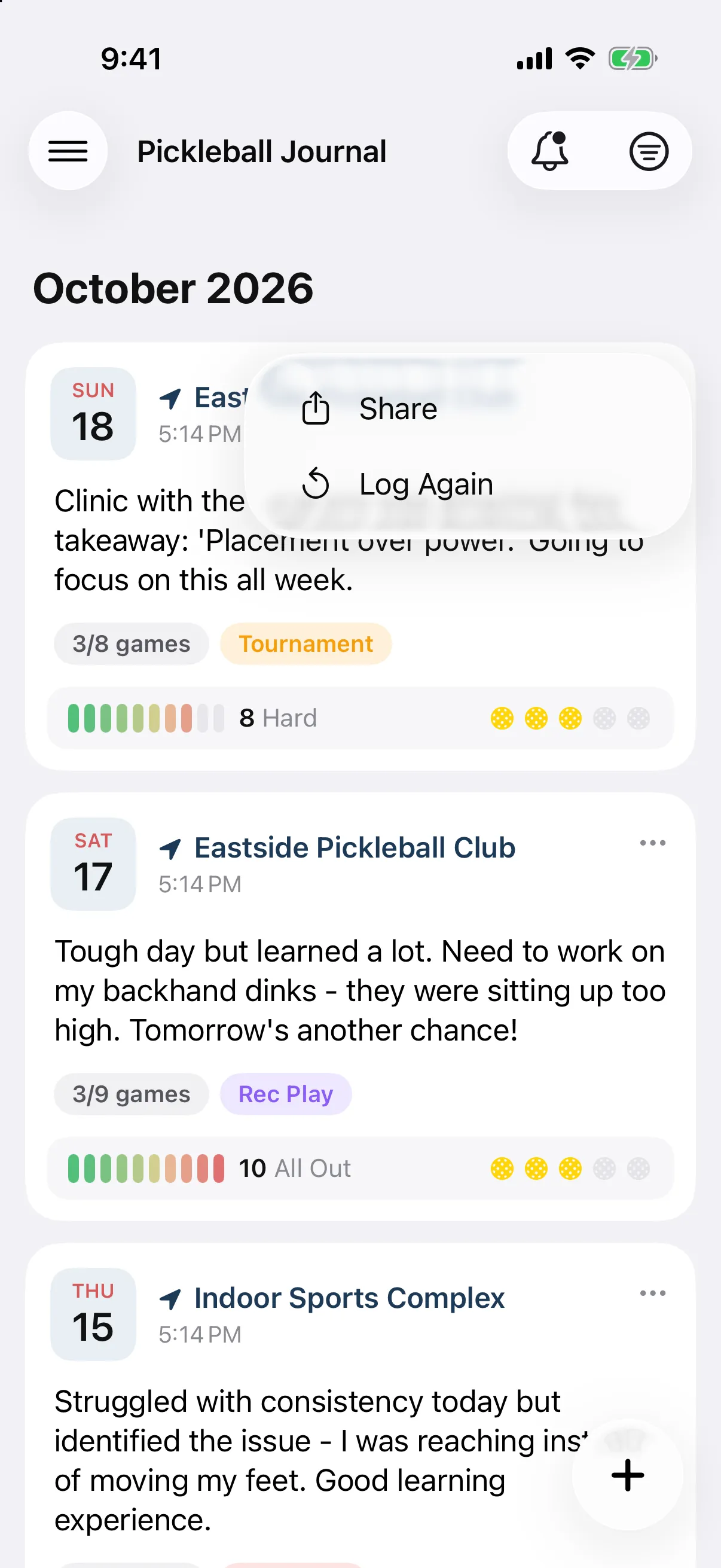
Share an entry
Section titled “Share an entry”- In the Journal, tap ••• at the top right of the card.
- Tap Share.
- Choose where to send it from the share sheet.
You send the card as a picture, with your photos, note, games, tags and workout as they appear in the Journal. Weather on the card includes Apple Weather credit.
Log Again
Section titled “Log Again”Playing the same place with the same people? Log Again starts a new entry for today with the old entry’s:
- Location, including whether it is outdoor
- Tags
- People
Games, ratings, notes, photos and workout are not copied. Your usual paddle and shoes are filled in if Auto-fill Last Paddle & Shoes is on.
- Tap ••• on the card you want to repeat.
- Tap Log Again.
- Finish the new entry and save it.
If you already have an unfinished draft, you are asked Replace your draft? Tap Replace to swap it, or Cancel to keep it. See Use drafts.
Share and Log Again are on iPhone only. On Android, open the entry to read it, or start a new one from the + button.